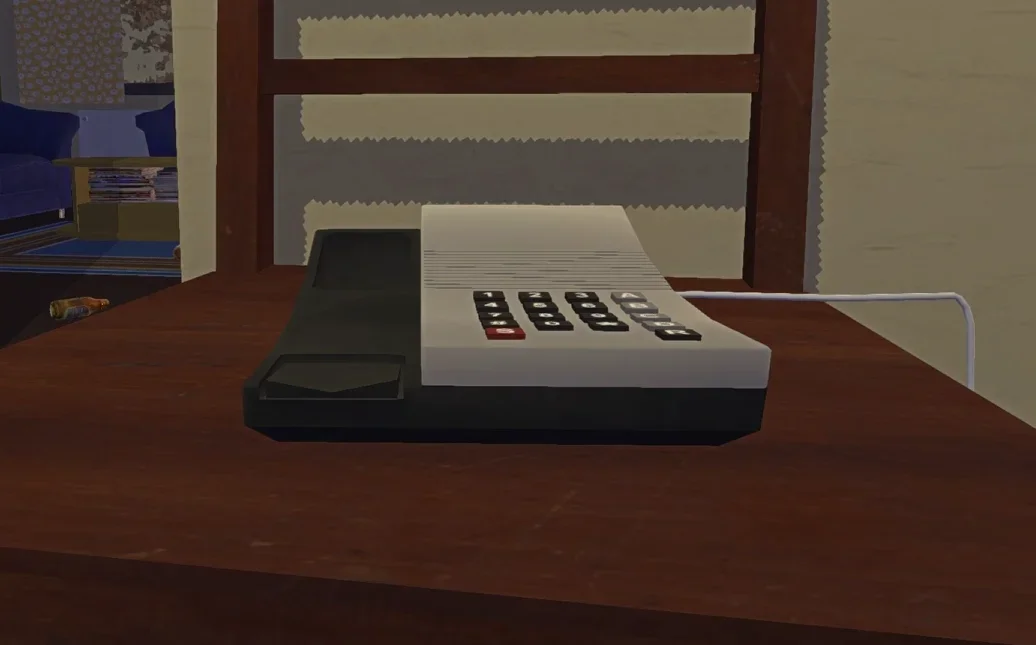
Let me tell you about my embarrassing first encounter with the phone system in My Winter Car. Two full hours. That’s how long I stared at that rotary phone, frantically hammering keys, listening to nothing but frustrated beeps echoing through my virtual Finnish apartment. My brilliant conclusion? The game was broken. Wrong. The broken thing was my understanding of how this deceptively simple mechanic actually works.
The phone system in My Winter Car embodies everything this Finnish survival simulator does best—it refuses to hold your hand. Once you crack the code, it’s stupidly simple. But until that lightbulb moment hits, you’re stuck in tutorial hell with zero tutorials. Sound familiar? If you’re here reading this, I’m betting you’ve already thrown your hands up at least once wondering why these fictional Finns won’t answer their damn phones.
Good news: you’re about to become a telecommunication expert in 1990s rural Finland.
Key Takeaways:
 Arc Raiders Skills Are Lying To You: Here Is What They Actually Do
- Your keyboard’s numpad is the only input method that works—that top number row is completely useless
- The phone chills in your apartment hallway on a chair right by the front door
- Patience is mandatory—hang up before the NPC finishes talking, and your call never happened
- Laptop players without numpads will need workarounds: virtual keypads or external USB solutions
- NPCs aren’t available 24/7—Fleetari shuts down shop at 4 PM every single day
Table of Contents
Finding the Phone Location in My Winter Car
Your apartment hallway hosts the primary phone you’ll be using. Look for a chair positioned right next to your front door—that’s where it lives. Most players walk past this thing a dozen times before actually noticing it, especially when you’re busy juggling the game’s survival mechanics, monitoring your body temperature, and decoding that cryptic “Problem” meter. I literally discovered mine by pure accident when it started ringing mid-fumble with the door handle.
Incoming calls work exactly how you’d expect—interact with the ringing phone, pick up, done. Callers drop hints about objectives, provide updates on jobs, or occasionally just mess with you because apparently prank calls were peak entertainment in 1999 Finland.
The apartment phone isn’t your only option. The PSK gas station has a payphone positioned near the bulletin board—super convenient since job postings hang on that same wall. Your parents’ house also has a kitchen phone you can access. Learning these locations early saves you considerable headaches during those critical first days when every minute counts.
 Stop Building Like A Noob: Advanced Tactics To Break ‘Alchemy Factory’
 My Winter Car How to Call: Step-by-Step Walkthrough
This is where everything falls apart for most players, myself absolutely included. The logic seems bulletproof: grab the phone, punch in digits, wait for pickup. Easy, right? Except My Winter Car has one non-negotiable requirement that it never, ever bothers explaining: the numpad is your only option. Not the number row sitting above QWERTY. Not some clickable on-screen interface. The dedicated numeric keypad on the right side of your full-sized keyboard.
Let me walk you through the foolproof process. Approach the phone and hit E (or whatever interact key you’ve mapped) to lift the receiver. Listen for the dial tone—that’s your signal to proceed. Now comes the critical part: using exclusively your numpad, type out the complete phone number. Skip any dashes or formatting—if you see 08-712112 written down, you’re typing 08712112 straight through. After entering every digit, press Enter on that same numpad to place the call. Ringing sounds follow, then eventually your NPC picks up.
 Octopath Traveler 0 Beginner’s Guide: How to Survive the Grind Without Losing Your Soul
 Here’s where I personally screwed up more times than I care to admit: you absolutely must wait until the NPC completely finishes their entire dialogue and hangs up first. Dropping the receiver early means the game treats it like the interaction never occurred. I once called about purchasing the project car, hung up thinking we were done, then spent twenty increasingly confused minutes wondering why nothing changed. The seller was still mid-sentence. Always listen for that definitive click indicating the NPC has disconnected before you touch anything.
Want to dial more efficiently? Type each digit with deliberate intention, adding tiny pauses between numbers. The game needs processing time for each keystroke—mashing buttons rapidly causes missed inputs. If you’re hearing beeps without the subsequent ringing tone, you’ve either skipped a digit or the phone didn’t register your full input.
 My Winter Car Tips: 7 Essential Secrets The Game Won’t Tell You (2026)
 My Winter Car How to Call: Why Numpad is Required
Those maddening beeps that drive new players insane? That’s what happens when you use the top number row. The game’s phone system exclusively accepts numpad inputs for dialing. Period. This isn’t some weird glitch or oversight—it’s intentional design.
Steam discussion forums are absolutely flooded with players who’ve reinstalled the entire game before stumbling across the numpad requirement buried in some random comment thread. If the phone system has been your nemesis, double-check which keys you’ve been hitting. From a simulation authenticity perspective, the numpad-only approach makes sense. From a user experience perspective, one tiny tooltip would’ve prevented countless frustration-induced rage quits.
 Berry Bury Berry: Every Achievement You Can Actually Miss
 Laptop Users: My Winter Car How to Call Without a Numpad
No dedicated numpad? That’s a legitimate problem. Your simplest solution lives right inside Windows: the On-Screen Keyboard. Press Windows + Ctrl + O simultaneously to launch it, navigate to “Options,” and toggle on the numpad display. Boom—virtual number pad you can click with your mouse.
Alternatively, grab specialized software like Numpad Emulator from SourceForge. It creates a compact virtual keypad that won’t dominate your screen like Windows’ full keyboard does. For a permanent fix, invest in a cheap USB numeric keypad—they run under $15. I bought one specifically for this game and now use it constantly for other applications too.
Some laptops hide numpad functionality behind specific key combinations. Look for numbers printed in alternate colors on keys like J, K, L, U, I, O. Enable Num Lock (typically Fn + Num Lk) and those letters transform into a temporary numpad. Check your laptop’s documentation if you’re unsure.
 Crisol: Theater of Idols Ultrawide & FOV Fix That Actually Works
 What the Phone is Used For: My Winter Car How to Call People
The phone isn’t decorative flavor text—it’s your gateway to basically everything important in this game. Without phone access, you’re locked out of buying your project car, applying for critical jobs, ordering necessary parts, and responding to classifieds.
Your first major phone transaction involves purchasing the Corris Rivett project car. Find the classified listing in your newspaper (scan for mentions of cylinder heads and a 500mk asking price), dial 08-609553, then exercise patience while the seller talks. Once the conversation properly concludes, a dart icon materializes on your map showing exactly where to collect your new pile of automotive misery.
Jobs depend heavily on phone interactions. The taxi gig requires calling 08-712112, after which you’ll meet the owner at PSK during the next weekday at noon. The delivery job number (usually 08-231206) gets posted at the gas station. These income sources fund your parts purchases, utility bills, and basic survival needs. Even the parts catalog from Fleetari’s shop operates through phone orders—dialing commits you to immediate purchase, so budget accordingly.
Incoming calls carry weight too. NPCs phone with job opportunities, repair status updates, or specific requests. Missing these calls might mean missed chances for progress. Make checking your apartment phone a regular habit. Juggling employment, car restoration, and message monitoring forms the core gameplay loop.
 Cloudheim Starter Guide: Stop Hoarding and Start Kicking
 My Winter Car How to Call: Phone Numbers and NPC Hours
Calling NPCs at inappropriate times became my recurring mistake. Fleetari’s Repair Shop closes at 4 PM daily without exception—calling him at 9 PM results in endless ringing and zero results. Schedule your calls around these business hours.
Essential numbers (note: some classifieds vary between playthroughs):
Taxi Job: 08-712112 (meet at PSK the following weekday at noon)
Delivery Job: 08-231206 (check gas station bulletin board for confirmation)
Project Car: 08-609553 (listed in newspaper classifieds, costs 500 marks)
Newspaper advertisements change based on your current in-game day. Always reference your active newspaper rather than blindly copying numbers from online guides.
The Futufon factory job doesn’t require phone contact—apply in person at the facility located near the bridge past Fleetari’s shop. Operating hours run 7 AM to 5 PM on weekdays only.
 Windrose Demo Guide: Survive, Sail, and Stop Dying Early
 Troubleshooting My Winter Car How to Call Problems
Hearing beeps without ringing? You’re using incorrect keys. Switch exclusively to numpad input—top row numbers are non-functional for this purpose.
Phone rings indefinitely without anyone answering? Check the in-game clock. NPCs follow business schedules and won’t pick up at 3 AM.
Completed call produces zero results? You disconnected prematurely. NPCs must finish speaking entirely and hang up first before the interaction registers properly.
Steam overlay occasionally causes input conflicts—try temporarily disabling it if your numpad functions normally outside the game but fails within it.
Dealing with alcoholism mechanics affecting your gameplay? Our dedicated alcoholism cure guide explains managing that particular stat without derailing your progress.
 My Winter Car Phone Guide: All Numbers, Locations & How to Call (2026)
 How Car Calling Works in Other Games
If you landed here searching for GTA information: in GTA V and GTA Online, summoning your personal vehicle requires opening your phone, navigating to Contacts, and calling the Mechanic. Unlike My Winter Car’s system, GTA uses on-screen navigation mechanics.
For real-world Bluetooth phone-to-car pairing, enable Bluetooth on both devices, activate pairing mode on your vehicle’s system, select your car from your phone’s Bluetooth menu, confirm matching codes, and grant necessary permissions. My Winter Car doesn’t simulate smartphone technology—you’re stuck with landline limitations appropriate to 1999 Finland.
 Crisol Theater of Idols: All 35 Crow Relic Locations
 My Winter Car How to Call for the Project Car
The primary vehicle you’ll restore is the Corris Rivett, modeled after the Ford Taunus. Acquisition begins with finding the newspaper classified (look for cylinder head mentions and the 500mk price tag), then calling 08-609553 to speak with Reijo. Exercise patience until he completely finishes talking and disconnects. A dart icon then appears on your map marking the pickup location—identical to the firewood buyer’s spot from My Summer Car.
Rebuilding the Rivett requires ordering components through phone calls to numbers listed in Fleetari’s parts magazine (the catalog itself costs approximately 15mk). Each purchase demands a separate call, and dialing instantly confirms your order. Budget carefully before making any calls.
 How to Build My Winter Car Corris Rivett – ALL PARTS & ASSEMBLY PROCESS EXPLAINED
 Final Thoughts on My Winter Car How to Call System
The phone system transforms from infuriating obstacle to indispensable tool once you understand its quirks. Three rules solve virtually every problem: use the numpad exclusively, wait for NPCs to finish speaking completely, and respect business hours. Those guidelines eliminate ninety percent of phone-related frustrations.
What I genuinely appreciate about My Winter Car’s communication system is how it forces meaningful engagement with the world instead of enabling fast-travel convenience between objectives. Writing down numbers, planning calls around schedules, physically checking for messages—these elements collectively create immersive simulation. Frustrating initially? Absolutely. Rewarding once mastered? Even more so.
For additional strategies, explore our complete beginner’s survival guide and essential tips compilation. Looking for something different? Our friends at GameNero offer excellent resources covering Octopath Traveler’s weapon database and MineMogul automation fundamentals.
 Arc Raiders Attachment Guide: Stats, Blueprints & Best Builds, and The $7,000 Trap
 FAQs About My Winter Car How to Call and Phones
How do I call my car in GTA?
In GTA V and GTA Online, press the up arrow to open your phone, navigate to Contacts, select the Mechanic, and request vehicle delivery. Your car spawns at the nearest accessible road within seconds. Unlike My Winter Car’s keyboard-based system, GTA relies on on-screen navigation.
Is My Winter Car a thing?
Yes, My Winter Car entered Steam Early Access in late December 2025. Developed by Amistech Games (creator Toplessgun), it’s the sequel to My Summer Car, set during brutal Finnish winter 1999. The developers explicitly designed it for players who’ve already conquered the original game’s challenges.
How do I connect my phone to my car for calls?
Enable Bluetooth on both devices, activate pairing mode on your vehicle’s infotainment system, select your car from your phone’s Bluetooth device list, confirm matching pairing codes, and approve requested permissions. Most modern vehicles streamline this process, though older systems might require consulting your owner’s manual.
What car is going to be in My Winter Car?
The main project car is the Corris Rivett (based on the Ford Taunus), purchased by calling 08-609553 after locating the newspaper classified. Additional vehicles include the taxi (Mercedes W124), Jonnez ES moped, Kekmet tractor, and Bachglotz loaner from Fleetari’s shop.
 How To Access The “Friendly Lobby” In ARC Raiders By Being A Total Pacifist